Variant-tournament: Unterschied zwischen den Versionen
Keine Bearbeitungszusammenfassung |
Keine Bearbeitungszusammenfassung |
||
| (12 dazwischenliegende Versionen desselben Benutzers werden nicht angezeigt) | |||
| Zeile 1: | Zeile 1: | ||
[[Datei: | == Holes Tournament == | ||
* [https://forums.online-go.com/t/variant-tournament/53966/36 OGS-Forum] | |||
* [https://www.govariants.com/ Variant-Server] | |||
==== Current Standings ==== | |||
[[Datei:Varianten_Turnier.png]]. | |||
==== Round 3 Pairings ==== | |||
[[Datei:Runde 3.png]] | |||
==== Instructions for the Govariants server: How to create a game ==== | |||
* To create a game you need to be '''logged-in'''. It’s possible to log-in as a guest without registering, but I recommend creating an account. If you have trouble with registering an account, please let me know. | |||
* On the starting page you can configure parameters for creating a new game: | |||
** The variant '''baduk''' is preselected, which is right for this tournament. | |||
** Select the Pattern '''Rectangular with holes''' and copy-paste the '''current Bitmap''' into the text input for the bitmap: | |||
** Increase Komi to 7.5. | |||
** Select the Time Control mode '''Fischer''' with 900s Main Time (= 15 minutes), 10s Increment and uncheck the Max checkbox. | |||
* '''Current Bitmap''' with 5 holes | |||
[[Datei:Variant.png|301x301px|mini]]<blockquote>[ | |||
[3,3,3,3,3,3,3,3,3,3,3,3,3,3,3,3,3,3,3], | |||
[3,3,3,3,3,3,3,3,3,3,3,3,3,3,3,3,3,3,3], | |||
[3,3,3,3,3,3,3,3,3,3,3,3,3,3,3,3,3,3,3], | |||
[3,3,3,3,3,3,3,3,3,3,3,3,3,3,3,3,3,3,3], | |||
[3,3,3,3,3,3,3,3,3,3,3,3,3,3,3,3,3,3,3], | |||
[3,3,3,3,3,3,3,3,3,3,3,3,3,3,3,3,3,3,3], | |||
[3,3,3,3,3,3,3,3,3,3,3,3,3,3,3,3,3,3,3], | |||
[3,3,3,3,3,3,3,3,3,3,3,3,3,3,3,3,3,3,3], | |||
[3,3,3,3,3,3,3,3,3,3,3,3,3,3,3,3,3,3,3], | |||
[3,3,3,3,3,3,3,3,3,3,3,3,3,3,3,3,3,3,3], | |||
[3,3,3,3,3,3,3,3,3,3,3,3,3,3,3,3,3,3,3], | |||
[3,3,0,3,3,3,3,3,3,0,3,3,3,3,3,3,3,3,3], | |||
[3,3,3,3,3,3,3,3,3,3,3,3,3,3,3,3,3,3,3], | |||
[3,3,3,3,3,3,3,3,3,3,3,3,3,3,3,3,3,3,3], | |||
[3,3,3,3,3,3,0,3,3,3,3,3,3,3,3,3,3,3,3], | |||
[3,3,3,3,3,3,3,3,3,3,3,3,3,3,3,3,3,3,3], | |||
[3,3,3,3,3,3,0,3,3,3,3,3,3,3,0,3,3,3,3], | |||
[3,3,3,3,3,3,3,3,3,3,3,3,3,3,3,3,3,3,3], | |||
[3,3,3,3,3,3,3,3,3,3,3,3,3,3,3,3,3,3,3] | |||
] | |||
* Your settings should look like this: [[Datei:Variant settings.png|590x590px]]</blockquote> | |||
* After clicking '''Create Game''' you will be navigated to the page for your new game. It should look like this: [[Datei:Create variant game.png|rand]] | |||
* Click “Take Seat” and you’re ready to play! The other player(s) can find the new game via the games list, or you can send them the link. | |||
Aktuelle Version vom 10. April 2025, 20:43 Uhr
Holes Tournament
Current Standings
 .
.
Round 3 Pairings

Instructions for the Govariants server: How to create a game
- To create a game you need to be logged-in. It’s possible to log-in as a guest without registering, but I recommend creating an account. If you have trouble with registering an account, please let me know.
- On the starting page you can configure parameters for creating a new game:
- The variant baduk is preselected, which is right for this tournament.
- Select the Pattern Rectangular with holes and copy-paste the current Bitmap into the text input for the bitmap:
- Increase Komi to 7.5.
- Select the Time Control mode Fischer with 900s Main Time (= 15 minutes), 10s Increment and uncheck the Max checkbox.
- Current Bitmap with 5 holes

[
[3,3,3,3,3,3,3,3,3,3,3,3,3,3,3,3,3,3,3],
[3,3,3,3,3,3,3,3,3,3,3,3,3,3,3,3,3,3,3],
[3,3,3,3,3,3,3,3,3,3,3,3,3,3,3,3,3,3,3],
[3,3,3,3,3,3,3,3,3,3,3,3,3,3,3,3,3,3,3],
[3,3,3,3,3,3,3,3,3,3,3,3,3,3,3,3,3,3,3],
[3,3,3,3,3,3,3,3,3,3,3,3,3,3,3,3,3,3,3],
[3,3,3,3,3,3,3,3,3,3,3,3,3,3,3,3,3,3,3],
[3,3,3,3,3,3,3,3,3,3,3,3,3,3,3,3,3,3,3],
[3,3,3,3,3,3,3,3,3,3,3,3,3,3,3,3,3,3,3],
[3,3,3,3,3,3,3,3,3,3,3,3,3,3,3,3,3,3,3],
[3,3,3,3,3,3,3,3,3,3,3,3,3,3,3,3,3,3,3],
[3,3,0,3,3,3,3,3,3,0,3,3,3,3,3,3,3,3,3],
[3,3,3,3,3,3,3,3,3,3,3,3,3,3,3,3,3,3,3],
[3,3,3,3,3,3,3,3,3,3,3,3,3,3,3,3,3,3,3],
[3,3,3,3,3,3,0,3,3,3,3,3,3,3,3,3,3,3,3],
[3,3,3,3,3,3,3,3,3,3,3,3,3,3,3,3,3,3,3],
[3,3,3,3,3,3,0,3,3,3,3,3,3,3,0,3,3,3,3],
[3,3,3,3,3,3,3,3,3,3,3,3,3,3,3,3,3,3,3],
[3,3,3,3,3,3,3,3,3,3,3,3,3,3,3,3,3,3,3]
]
- Your settings should look like this:

- After clicking Create Game you will be navigated to the page for your new game. It should look like this:
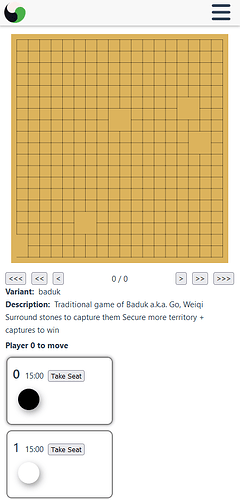
- Click “Take Seat” and you’re ready to play! The other player(s) can find the new game via the games list, or you can send them the link.